GPU vs CPU for AI: Complete Performance, Cost, and Use Case Comparison for 2025
Try VOLT Intelligence
Get StartedTry VOLT Cloud
Deploy GPUTable of Contents
- Understanding CPU and GPU Architecture for AI
- How CPUs Process AI Workloads
- How GPUs Accelerate AI Computation
- Why AI Favors Parallel Processing
- Performance Comparison: GPU vs CPU for AI Tasks
- Training Performance Benchmarks
- Inference Performance Analysis
- Memory and Data Transfer Considerations
- Cost Analysis: GPU vs CPU for AI Projects
- Hardware Acquisition Costs
- Operational Costs and TCO
- ROI Considerations by Project Scale
- Hybrid Architectures: Combining CPU and GPU Power
- Workload Distribution Strategies
- Scaling from CPU to GPU
- Framework and Software Considerations
- GPU Acceleration Support by Framework
- Software Requirements and Setup
- Making the Decision: GPU vs CPU for Your AI Project
- Decision Framework
- Recommendations by AI Application Type
- Future Trends: The Evolution of AI Hardware
- Now What?
- Frequently Asked Questions
When developing AI applications, choosing between GPU and CPU processors represents one of the most critical infrastructure decisions you'll make. This choice will impact model training speed, inference performance, operational costs, and ultimately, the launch of your AI project and its ability to scale.
GPUs are now synonymous with AI acceleration, delivering 10 to 100 times faster training for deep learning models. But CPUs remain cost-effective for specific tasks and workloads like small model inference and data preprocessing.
For teams looking for cost-effective GPU access to power next generation AI, decentralized GPU networks offer enterprise-grade resources at significantly reduced costs. In this post we will explore the main differences in GPU vs CPU for AI app development. Let’s dive in.
Understanding CPU and GPU Architecture for AI
CPUs and GPUs have fundamental architectural differences that determine their suitability for various AI workloads. These distinctions stem from their original design purposes.
CPUs were originally designed for general-purpose computing requiring flexibility and complex decision-making. GPUs, on the other hand, were designed to outperform CPUs for 3D graphics rendering that required massive parallel computation. Early use cases include video game development in the early 2000s and, much later, visual effects in filmmaking.
How CPUs Process AI Workloads
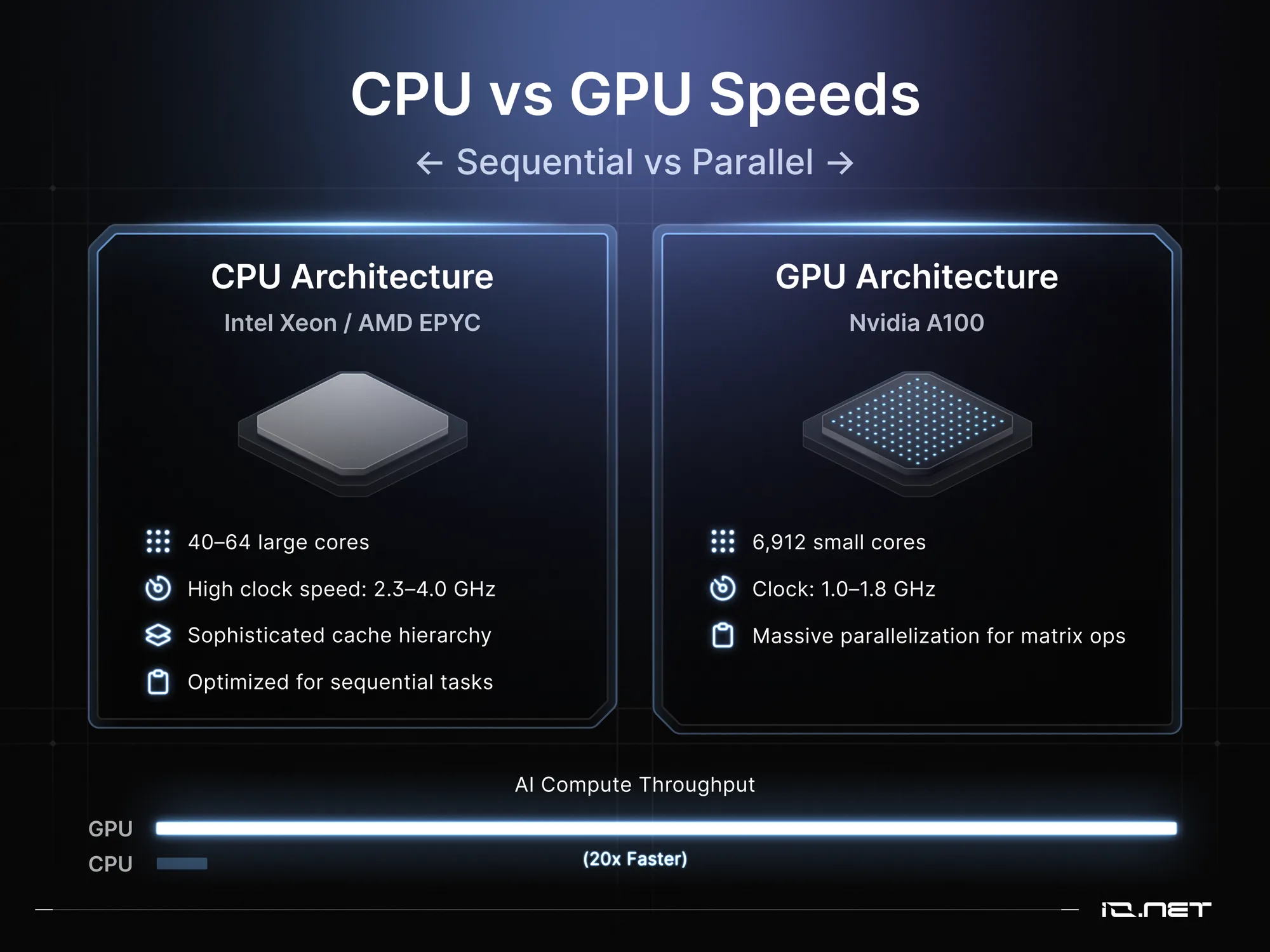
Central Processing Units operate on sequential processing architecture, which is optimized for single-threaded performance and complex instruction execution. Modern CPUs like the Intel Xeon Platinum 8380 or AMD EPYC 7763 feature 40 to 64 cores, each capable of handling sophisticated instructions with high clock speeds ranging from 2.3 to 4.0 GHz. CPUs feature sophisticated cache hierarchy, including L1, L2, and L3 caches, that enable rapid access to frequently used data, which minimizes memory latency for its sequential operations.
CPUs are ideal for irregular workloads and complex control flow because they excel at branch prediction and out-of-order execution. With their large instruction sets, they can handle diverse operations from integer arithmetic to complex floating-point calculations.
With this versatility, CPUs can efficiently handle tasks like data preprocessing, feature extraction, and traditional machine learning algorithms that don't benefit from massive parallelization. CPUs can execute different instructions on different cores simultaneously, making them highly suitable for the heterogeneous workloads that are common in production-grade AI systems.
How GPUs Accelerate AI Computation
Graphics Processing Units employ parallel processing architecture, with thousands of smaller, specialized cores designed for simultaneous computations.
The NVIDIA A100, for instance, contains 6,912 CUDA cores organized into streaming multiprocessors, which gives it the capacity for massive parallelization of matrix operations that are fundamental to training modern neural networks. While these cores operate at lower clock speeds (typically 1.0 to 1.8 GHz), they compensate for it through sheer volume and parallel execution capabilities.
Modern AI-optimized GPUs feature specialized hardware including Tensor Cores, which accelerate mixed-precision matrix multiplication by up to 20 times compared to standard CUDA cores.
The NVIDIA H100, for instance, provides 989 TFLOPS of TF32 Tensor Core performance, a figure that dwarfs the computational throughput of even the most powerful CPUs. GPU memory bandwidth (2,039 GB/s on the A100 and 3.35 TB/s on the H100) far exceeds CPU memory bandwidth. This makes GPUs ideal for the rapid data movement that is essential for training large models with billions of parameters seen in popular models like Gemini 3, ChatGPT, and other LLMs.
Why AI Favors Parallel Processing
Neural network training involves extensive matrix multiplication operations that naturally parallelize across thousands of independent calculations.
In the forward propagation process, each neuron's activation requires computing weighted sums across potentially thousands of inputs simultaneously. Backpropagation also benefits from parallel gradient calculations across mini-batches, where identical operations apply to different data samples concurrently.
Consider the training of the computer vision model ResNet-50 model on ImageNet, a massive, annotated image database that is designed for developing and benchmarking computer vision algorithms. Each batch processes 32 to 256 images simultaneously, with each image containing 224×224×3 pixels requiring millions of multiply-accumulate operations per layer.
GPUs process these operations in parallel across their thousands of cores, while CPUs handle them sequentially or across their limited core count. This explains the dramatic differences in performance between CPUs and GPUs for deep learning workloads. GPU’s parallelization advantage compounds with model depth, making them increasingly vital as networks scale from dozens to hundreds of layers.
Ready to cut your AI costs by 70%?
Save up to 70% on compute costs today.
Performance Comparison: GPU vs CPU for AI Tasks
Real-world benchmarks illustrate the significant performance disparities between GPUs and CPUs across different AI workloads. That said, the magnitude of these performance disparities vary significantly based on model architecture, dataset size, and optimization level.
Training Performance Benchmarks
When exploring GPU vs CPU training performance, the differences are most apparent with large neural networks that require billions of parameters and extensive computational resources.
According to MLPerf v2.0 benchmarks, training ResNet-50 to convergence demonstrates significant speedups on NVIDIA A100 GPUs compared to CPU systems, with GPU-accelerated training completing in substantially less time. BERT-Large training demonstrates even more dramatic differences, with GPUs completing training significantly faster than CPU implementations.
For transformer models like GPT-2 (124M parameters), single V100 GPU training features faster throughput than optimized CPU implementations on 32-core systems. These performance gaps widen further with model size: GPT-3 scale models become essentially untrainable on CPU infrastructure within reasonable timeframes. Smaller models show reduced but still significant advantages: training a simple CNN for MNIST classification takes 12 minutes on an RTX 3060 versus 95 minutes on an Intel Core i9-12900K, demonstrating that even entry-level GPUs provide meaningful acceleration for modest deep learning tasks.
Inference Performance Analysis
Inference performance characteristics differ substantially from training, with CPUs being competitive for certain deployment scenarios. Batch inference strongly favors GPUs, with throughput advantages ranging from 5x to 50x depending on batch size and model complexity.
However, single-sample inference with strict latency requirements often favors CPUs, particularly for smaller models. CPU inference eliminates GPU memory transfer overhead, which can dominate inference time for simple models. A MobileNet v2 model achieves 8ms latency on modern CPUs versus 11ms on GPU including transfer time, making CPUs preferable for edge deployment scenarios requiring real-time response. Production inference servers benefit from CPU flexibility in handling variable workloads, dynamic batching, and multi-model serving without the complexity of GPU memory management.
Memory and Data Transfer Considerations
The limitations of GPU memory can significantly impact deployment decisions and model design choices. Consumer GPUs typically provide 12 to 24 GB VRAM, while professional cards offer 40 to 80 GB, constraining maximum model size and batch dimensions. This limitation requires techniques like model parallelism, gradient checkpointing, or mixed precision training for large networks. CPUs access system memory directly, supporting models limited only by available RAM, often 256 GB or more in server configurations.
Data transfer between CPU and GPU memory introduces overhead that can dominate execution time for small workloads. PCIe 4.0 provides 64 GB/s bidirectional bandwidth, creating bottlenecks when frequently moving data between host and device memory. Preprocessing pipelines must carefully orchestrate data movement to avoid stalling GPU computation, adding implementation complexity that CPU-only deployments avoid.
Cost Analysis: GPU vs CPU for AI Projects
The total cost of GPU or CPU ownership extends beyond initial hardware acquisition to include: operational expenses, cloud computing rates, maintenance costs, and opportunity costs from extended training times.
Hardware Acquisition Costs
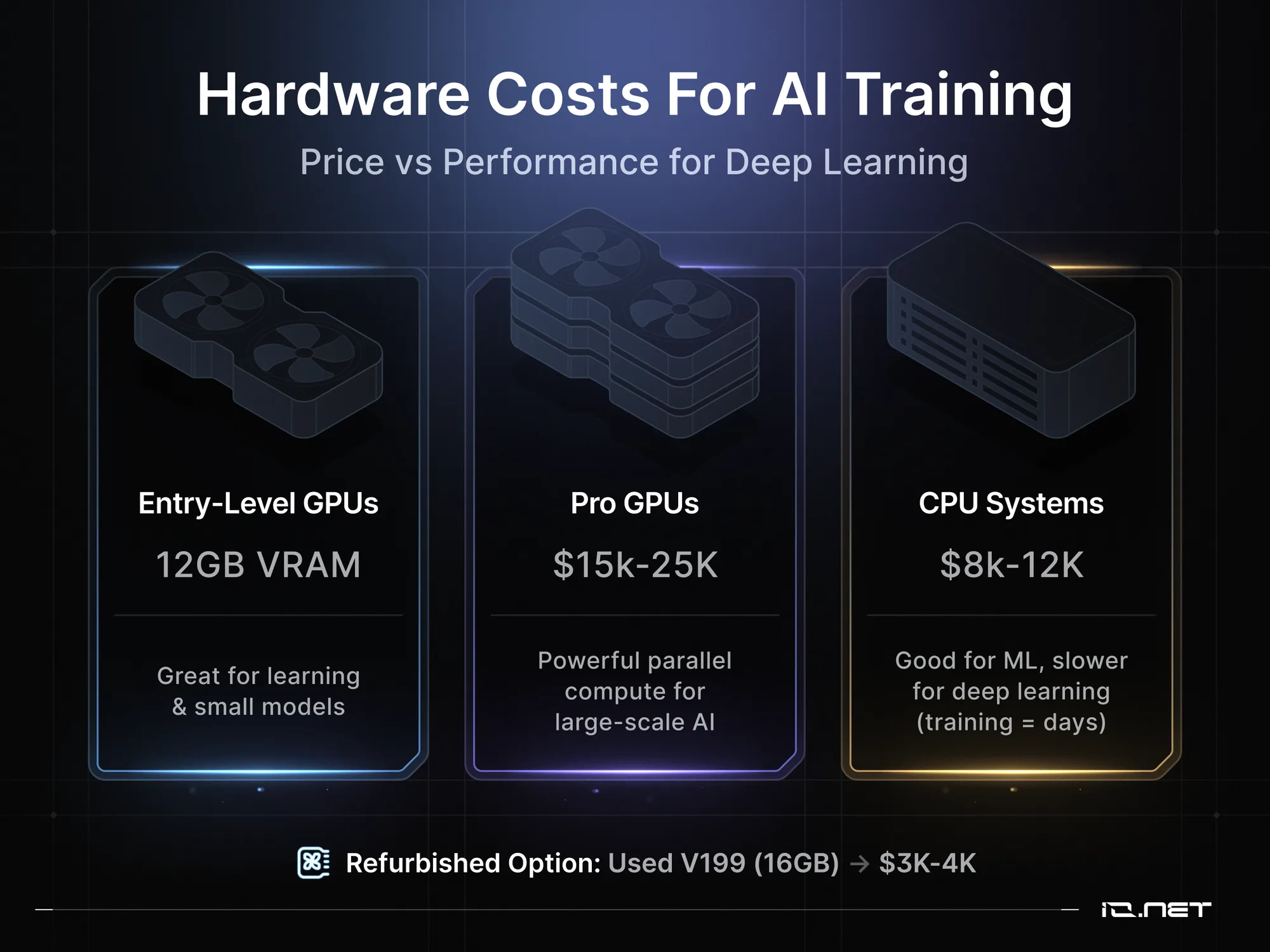
Entry-level AI development GPUs can range from $799 to $1200 for an RTX 4070 Ti with 12GB VRAM. These GPUs are best deployed for experimenting with medium-sized models and learning deep learning fundamentals. The costs of professional GPUs escalate quickly.
NVIDIA A100 40GB cards cost $10,000 to $15,000, while the latest H100 80GB go for over $30,000 per unit. Building a dual-GPU workstation for serious deep learning research requires at least $15,000 to $25,000 investment, and this does not factor in other costs for supporting infrastructure, like cooling and power supplies.
CPU-based AI systems appear more affordable, at least initially. A dual Intel Xeon Gold 6338 server with 512GB RAM costs approximately $8,000 to $12,000, which is a substantial computational resource for traditional machine learning and small-scale deep learning experiments. But when training times are measured in days rather than hours, cost advantages for deep learning applications can quickly be negated. A way around this for academics and startups with limited budgets is to explore refurbished or previous-generation hardware. Used V100 16GB GPUs, for instance, are available for $1,000 to $4,000, which is great price-performance and value for a wide variety of AI research applications.
Operational Costs and TCO
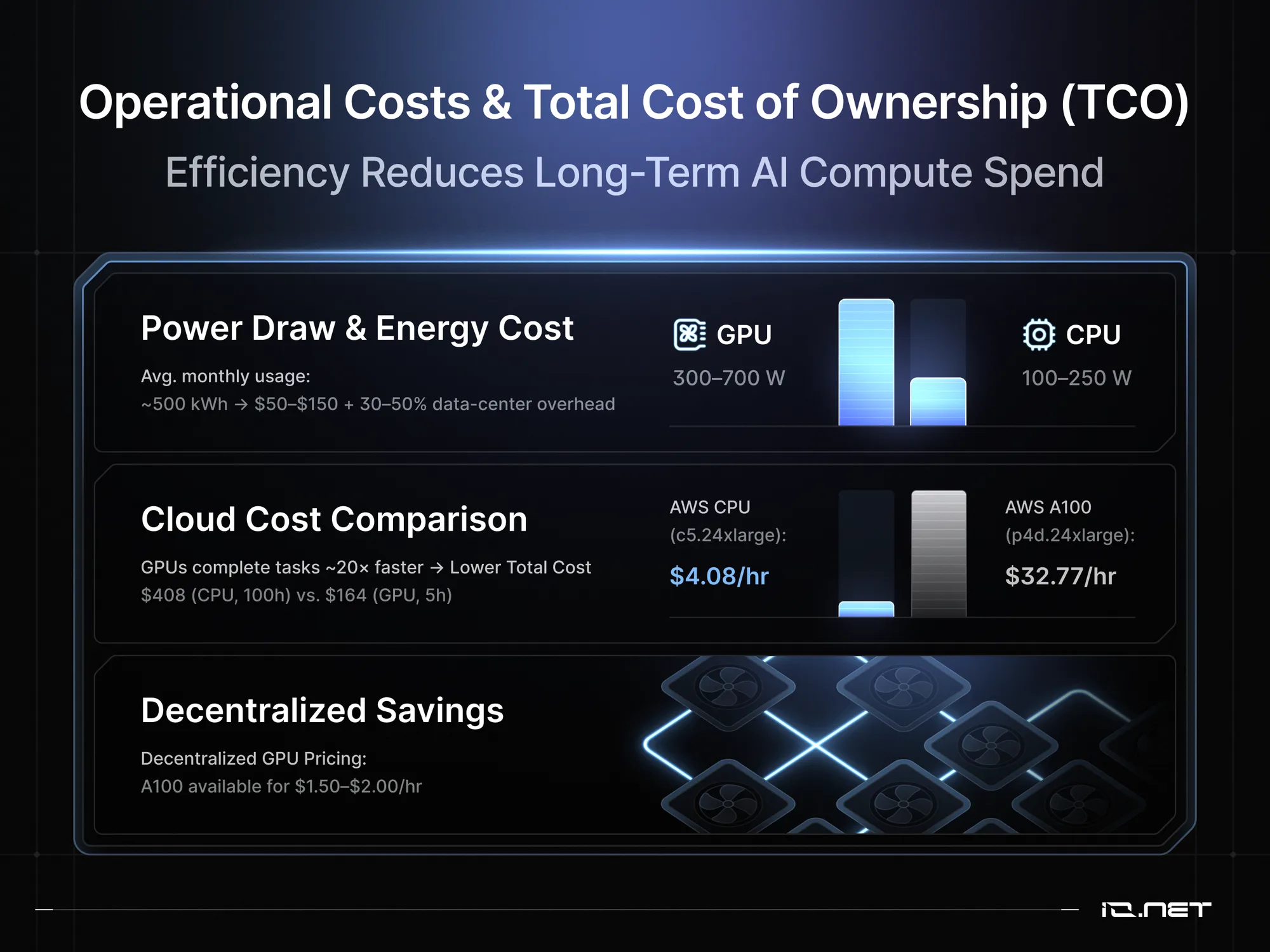
Both CPUs and GPUs are power hungry pieces of technology, which significantly impacts operational costs. High-end GPUs consume 300 to 700 watts under full load. An NVIDIA A100 system running continuously consumes approximately 500 kWh monthly, which translates to $50 to $150 depending on the going electricity rates. Add another 30 to 50% additional power consumption for data center deployments, and the operational expenses will escalate further.
Cloud compute pricing reveals stark differences between GPU and CPU instances. AWS p4d.24xlarge instances, for example, can have up to 8x the cost of comparable CPU instances, although this can vary by region and generation. However, faster training completion on GPUs often results in lower total costs despite higher hourly rates. Training a computer vision model requiring 100 hours on a CPU ($408) might complete in 5 hours on a GPU ($164), demonstrating how performance advantages translate to cost savings.
Teams looking to scale AI without getting strangled by infrastructure costs can take advantage of decentralized GPU marketplaces. Budget-conscious teams can access an A100 for $1.50 to $2.00 per hour (although rates can fluctuate by networks, region, and promotions), which is a substantial cost reduction compared to centralized cloud compute options.
ROI Considerations by Project Scale
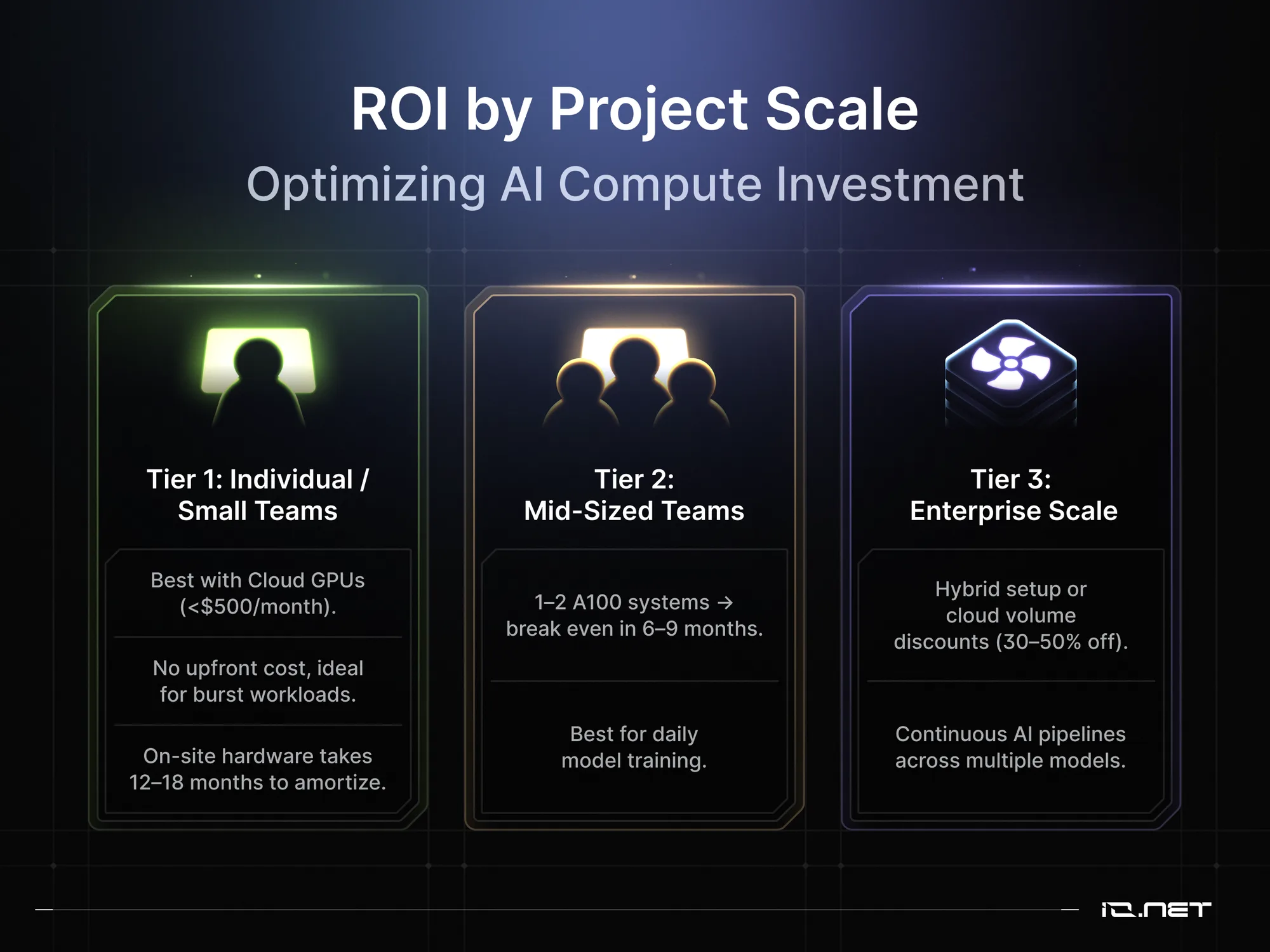
Individual developers and small research teams with burst training workloads will benefit from cloud GPU access compared to on-site hardware. With monthly costs under $500 for cloud GPUs, teams get an economical alternative to dedicated hardware, which can take 12-18 months to amortize. Mid-sized teams training models daily justify purchasing one or two A100 systems, and will typically break even to the point where the initial one-time cost of purchasing on-premises GPU hardware becomes equal to the cumulative, ongoing cost of sustained cloud GPU usage over the same period (6-9 months).
At the enterprise-scale, with AI operations that require continuous training pipelines that span dozens of models, on-site infra combines CPU clusters for preprocessing with GPU clusters for training. These large organizations are also able to negotiate volume discounts on cloud services, which reduces per-hour costs by 30-50% through reserved instances or enterprise agreements. This decision depends on training frequency, model size, and available technical expertise for managing on-premises infrastructure.
Hybrid Architectures: Combining CPU and GPU Power
As noted above, optimal AI infrastructure often combines CPU and GPU resources, leveraging each processor's strengths.
Workload Distribution Strategies
Pipeline architectures separate data preprocessing (CPU) from model training (GPU), maximizing utilization. Modern frameworks like TensorFlow and PyTorch automatically distribute operations between CPU and GPU based on operation characteristics.
Scaling from CPU to GPU
Progressive infrastructure investment allows teams to start with CPU development then migrate to GPUs as requirements grow. Organizations can leverage decentralized ML infrastructure to outperform big tech cloud monopolies by gradually increasing GPU resources as model complexity grows, accessing distributed computing power at a fraction of traditional cloud costs.
Framework and Software Considerations
GPU Acceleration Support by Framework
TensorFlow provides comprehensive GPU support through CUDA integration, automatically placing operations on appropriate devices. PyTorch offers intuitive GPU programming with explicit device management, giving developers fine-grained control. JAX provides functional programming abstractions with automatic differentiation and XLA compilation for excellent GPU performance.
Software Requirements and Setup
CUDA toolkit installation requires compatible driver versions and framework dependencies. Container-based deployments using Docker with NVIDIA Container Toolkit simplify GPU software management. CPU-only deployments avoid these complexities.
Making the Decision: GPU vs CPU for Your AI Project
Decision Framework
When choosing between GPU and CPU cores for your AI project, evaluate model size, training frequency, and latency requirements. Large neural networks (>100M parameters) indicate GPU necessity. Calculate total cost per training run under both scenarios. Consider how decentralized AI infrastructure solves GPU bottlenecks for machine learning teams through alternative infrastructure if traditional GPU access proves prohibitive.
Recommendations by AI Application Type
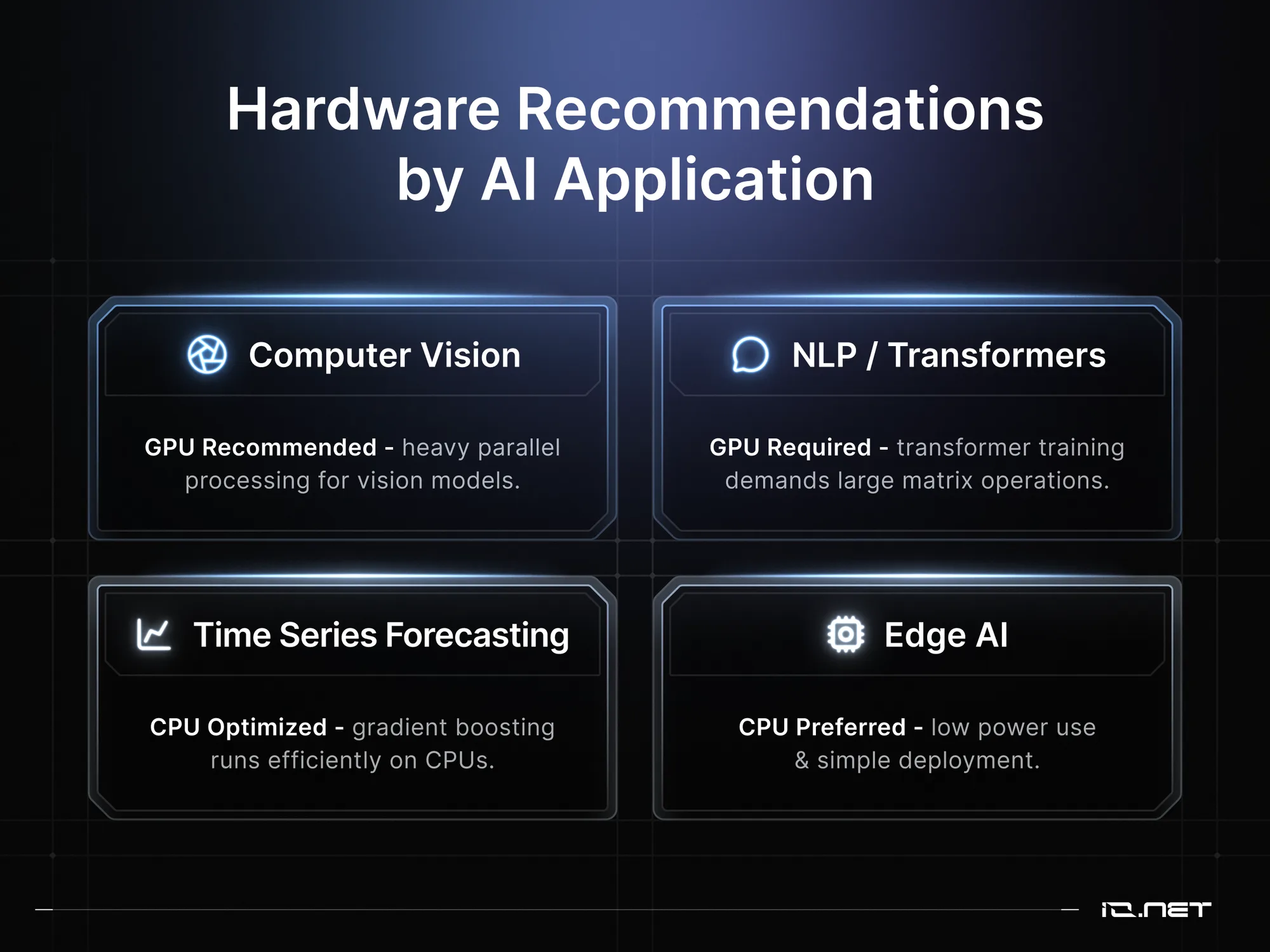
- Computer vision requires GPU acceleration for training.
- Natural language processing with transformers necessitates GPU resources.
- Time series forecasting achieves excellent results with CPU-optimized gradient boosting.
- Edge AI deployments favor CPU for power efficiency and simplicity.
Future Trends: The Evolution of AI Hardware
Specialized AI accelerators, like Google TPUs and AMD MI250, offer enticing alternatives to NVIDIA's dominance. CPU manufacturers increasingly incorporate AI-specific instructions, narrowing the performance gap for inference workloads. Decentralized GPU networks democratize access through distributed infrastructure, providing cost-effective alternatives to traditional cloud providers or in-house compute infra for teams looking to deploy AI models efficiently.
Ready to cut your AI costs by 70%?
Save up to 70% on compute costs today.
Now What?
As we’ve seen, the GPU vs CPU decision isn’t black and white. What you end up choosing really depends on model architecture, performance requirements, budget constraints, and operational considerations.
While GPUs provide dramatic acceleration for deep learning, CPUs remain optimal for preprocessing, traditional machine learning, and budget-constrained projects. Start with CPU-based prototyping before investing in GPU infrastructure. As models grow, progressively add GPU resources while maintaining CPU capacity for complementary workloads. Explore flexible GPU access through VOLT's decentralized network for cost-effective scaling options.
Understanding the GPU vs CPU tradeoff enables optimal infrastructure decisions balancing performance, cost, and complexity.
Frequently Asked Questions
Are GPUs always better than CPUs for AI? No, GPUs excel at training large neural networks but CPUs perform better for traditional ML algorithms, preprocessing tasks, and single-sample inference with strict latency requirements.
How much faster are GPUs for machine learning? For deep learning training, GPUs typically provide 10x to 100x speedup. MLPerf benchmarks show substantial performance advantages for GPU-accelerated training compared to CPU systems. Traditional ML algorithms often see no benefit.
When should I use CPU instead of GPU for AI? Use CPUs for traditional machine learning algorithms, data preprocessing, small model inference, and budget-constrained projects where power efficiency matters more than throughput.
What's the cost difference between GPU and CPU training? While GPU instances cost 5-10x more per hour, faster training often results in lower total costs. A model requiring 100 CPU hours ($408) might complete in thousands of GPU hours ($164).
Can I do AI inference on CPU effectively? Yes, CPU inference works well for smaller models, single-sample predictions, and when latency requirements are moderate. Many production systems use CPUs for inference.
What AI models work well on CPU? Traditional ML models, small neural networks (<10M parameters), and frameworks like XGBoost or LightGBM perform excellently on CPUs.
How many GPUs do I need? Start with one GPU and scale based on requirements. Small projects work with single consumer GPUs while production training may require 4-8 datacenter GPUs.
Is GPU necessary for small ML projects? No, small projects often run satisfactorily on CPUs. Begin with CPU development, moving to GPU only when performance becomes a bottleneck.
Ready to cut your AI costs by 70%?
Save up to 70% on compute costs today.