Parallel Computing: A Complete Guide to Models, Hardware, and Cloud Services
Try VOLT Intelligence
Get StartedTry VOLT Cloud
Deploy GPUTable of Contents
- What is Parallel Computing?
- Parallel vs. Concurrent vs. Distributed Computing
- Parallel Computing Decision Framework
- Cost and Performance: Cloud vs. On-Premises
- Best Practices for Parallel Computing Success
- Scale Parallel Workloads with VOLT Cloud
- Turning Parallel Computing Into Real Gains
- Frequently Asked Questions
- What exactly is parallel computing vs. concurrent vs. distributed?
- Which patterns (SIMD, SPMD, MapReduce) fit my use-case?
- How do I estimate speed-up before spending?
- Which hardware gives the best price/performance?
- What frameworks should I start with?

Your AI application just hit a wall. What used to take mere minutes to process now takes hours, and your single-threaded code can't keep up with growing data volumes. The profiler confirms it: you need parallel computing, but the CFO wants to know why you need more cores and what it'll cost.
This comprehensive guide covers everything from "what is parallel computing?" to "which hardware and cloud service fits my workload?". You'll learn how to identify parallelizable workloads, choose the right tools and infrastructure, and avoid common pitfalls that turn promising speed-ups into disappointing results.
By the end, you'll have actionable insights and performance metrics ready for tomorrow's compute planning meeting.
What is Parallel Computing?
The evolution toward programming massively parallel processors has fundamentally reshaped modern software development. Parallel computing splits massive computational problems into smaller pieces solved simultaneously, changing how we tackle computational challenges. It’s like twenty painters working on a house together instead of one. The difference is dramatic when a single-core processor takes days for a weather simulation while a GPU cluster finishes in hours.
Parallel computing uses multiple processing elements such as CPU cores, GPUs, multiple CPUs, or entire clusters to tackle tasks simultaneously. From Python splitting image filters across laptop cores to GPU training of billion-parameter AI models, the principle is the same. Divide work intelligently, process concurrently, and merge results efficiently.

Netflix exemplifies the parallel computing approach when re-encoding video content, which breaks videos into smaller chunks processed across AWS parallel workers. It’s a technique that reduces encoding time from days to hours without a loss in quality.
Epidemiologists now run million-agent disease models on AWS EC2 spot instances for pennies per simulation thanks to parallel cloud computing. But the approach isn't magic. Amdahl's Law demonstrates fundamental limits, stating that if 10% of a program must run sequentially, maximum theoretical speed-up caps at 10× regardless of how many cores you add.
Experiment with Python's concurrent.futures, a high-level library in Python for launching parallel tasks, on a simple file-download script to often see a 4–6× speed-up on a quad-core laptop with minimal code changes. Spot tasks that split naturally without coordination, like image thumbnails, Monte Carlo simulations, log parsing, or batch transformations. Then let the hardware work together instead of one processor grinding alone.
Parallel vs. Concurrent vs. Distributed Computing
Understanding the differences between parallel, concurrent, and distributed computing will help you identify which approach works for each challenge. Parallel computing is like having ten chefs slicing pizza at the same time on shared resources. Concurrent computing is one chef juggling tasks that overlap in time but never run simultaneously. Distributed computing ships distinct work packages to chefs in different cities, coordinating final assembly afterward.
Parallel computing excels when problems naturally split into independent chunks executable on CPU cores or GPU processors sharing memory. Python weather simulation scripts requiring 12 hours can complete in 45 minutes using Python parallel processing to distribute atmospheric layers across available cores.
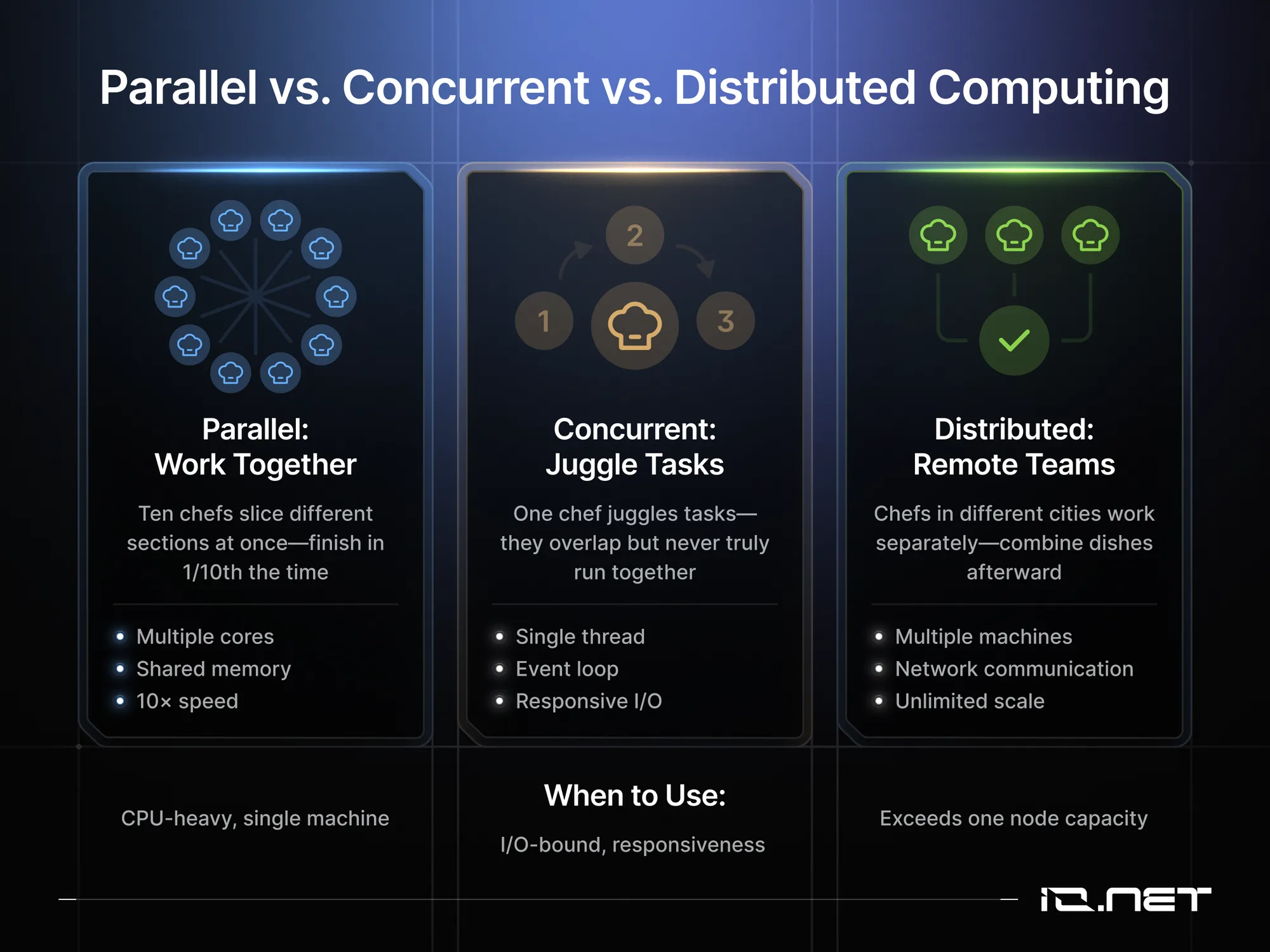
GPU parallel computing can be pushed even further. Nvidia's cuPy library, for example, accelerates matrix operations 30-100× by offloading calculations to thousands of CUDA cores, often requiring minimal code modifications. Concurrent computing fits scenarios where tasks must share state but prioritize responsiveness over raw throughput.
Node.js exemplifies concurrent computing in action, as it it handles thousands of simultaneous chat messages via event loops without spawning additional threads, improving responsiveness for I/O-bound operations When true parallelism becomes necessary in Node environments, developers can leverage worker threads or migrate performance-critical sections to C++ via N-API.
Distributed computing handles scale-out problems that exceed a single machine. CERN processes petabytes of collision data across global clusters using distributed compute, filtering huge datasets to surface meaningful events. Smaller teams can tap the same power by renting 1,000 AWS spot instances for parallel tasks, running genomics workloads in minutes for under $100, then shutting everything off with no long-term data center commitments.
Parallel Computing Decision Framework
Profile workloads first to understand your bottlenecks, then choose your approach:
Choose concurrent computing when CPU usage hovers around 30% while I/O queues spike. Your bottleneck is waiting for external resources (databases, APIs, file systems), not computation. Node.js, Python's asyncio, or Go's goroutines will keep your application responsive without adding processing power.
Choose parallel computing for computationally intensive tasks that fit on a single machine. If your profiler shows high CPU usage and your data fits in GPU memory, start with Numba or CuPy for 30-100× performance gains achievable within days. Multi-core CPU parallelization via Python's multiprocessing or OpenMP can deliver 4-8× speedups on typical workstations.
Choose distributed computing when data volumes or memory requirements exceed single-machine capacity. Migrate to Ray, Dask, or Spark for cloud-based auto-scaling from laptop prototypes to 10,000-core production deployments. This approach handles petabyte-scale datasets but introduces network overhead and coordination complexity.
Cut GPU costs by 90%
Enterprise-grade H100s and A100s at a fraction of hyperscaler pricing. Pay only for what you use.
Cost and Performance: Cloud vs. On-Premises
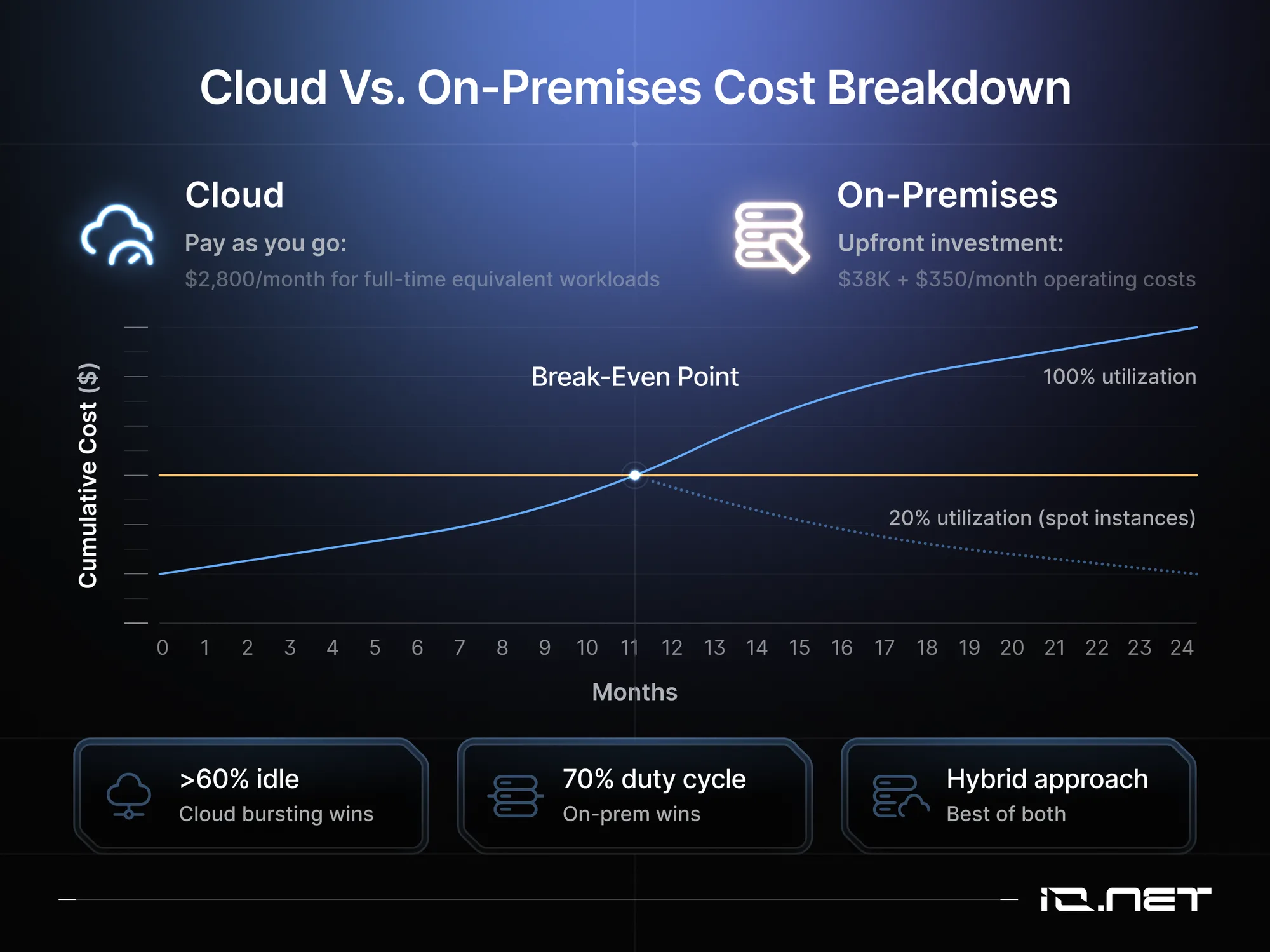
Hybrid setups combining on-premises hardware with cloud bursting often deliver the best value. Stanford researchers attempting to accelerate autism research by sharing genomic data achieved 4× faster genomics analysis using cloud resources versus on-premises clusters. The strategy: run steady preprocessing locally, burst gpu parallel computing to spot instances when needed.
Real numbers matter. A 64-core on-premises cluster costs $38,000 upfront and an additional $4,200/year for power and cooling. Equivalent cloud instances cost $2,800/month, breaking even at 14 months. But if GPU parallel computing jobs run only 20% of the time, spot instances beat dedicated hardware economics.
Hybrid orchestration via Slurm-on-Kubernetes or CycleCloud provides flexibility. A common pattern in fintech involves running compliance-sensitive Monte-Carlo models locally while bursting to 10,000+ cloud cores for overnight tests. A useful rule of thumb is that jobs exceeding 1,200 core-hours monthly may justify hardware purchase, while shorter jobs should rent.
Programming massively parallel processors works best by mixing cloud and on-premises approaches, leveraging decentralized cloud computing for peaks. The actionable insight is log actual utilization. is to track your actual cluster utilization over time. Monitor CPU hours used versus available, and measure idle time across weeks or months.
If your clusters sit idle more than 60% of the time, you'll save money by shifting to cloud-bursting for peak workloads. Conversely, if you maintain above 70% duty cycle consistently, the economics favor purchasing or leasing dedicated bare-metal hardware. Explore how blockchain is powering cloud computing for AI infrastructure alternatives.
Best Practices for Parallel Computing Success
For successful parallel computing implementation, follow proven patterns that separate transformative speed-ups from disappointing results. The difference between achieving 10× performance gains versus struggling with 2× improvements often hinges on methodical adherence to battle-tested principles.
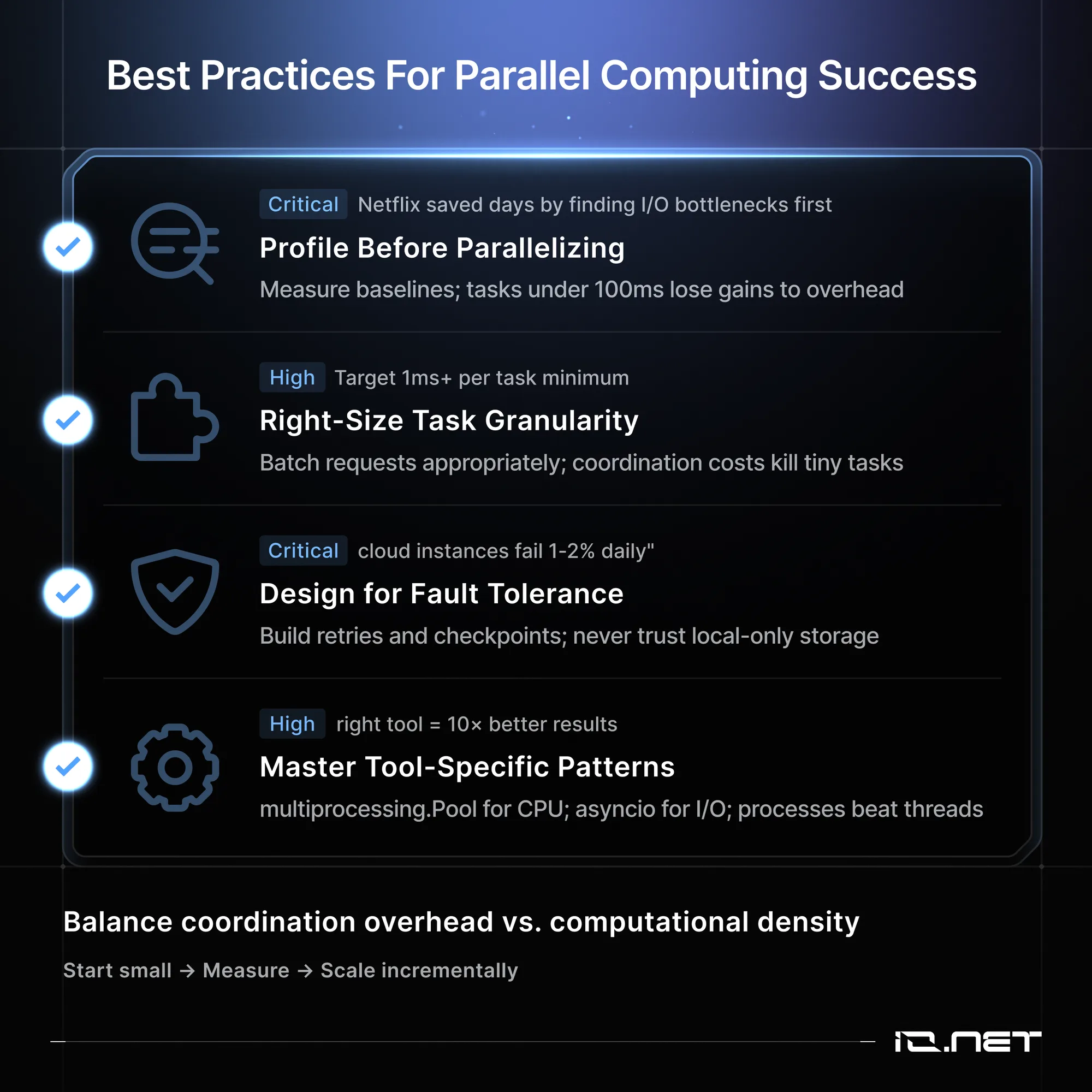
Start by profiling before parallelizing, as premature optimization wastes resources. Netflix's engineering team discovered that systematic profiling revealed I/O bottlenecks rather than CPU limitations in their video encoding pipeline. After they implemented parallel chunked encoding across cloud instances, they managed to reduce processing time from days to hours.
It’s also crucial to establish clear baselines, as tasks completing under 100ms may lose potential gains to parallelization overhead costs. Also select appropriate task granularity matching your workload characteristics. When processing millions 0of hourly requests, batching into correctly-sized chunks minimizes scheduling overhead while maximizing gpu parallel computing resource utilization.
Similarly, when programming massively parallel processors, target individual tasks requiring at least 1 millisecond execution time. Note that shorter durations get overwhelmed by coordination and communication costs, so build fault tolerance into architecture from the start, not as an afterthought. Production parallel computing in cloud computing environments experiences 1-2% daily instance failure rates as normal operating conditions.
300K+ GPUs ready when you are
Global decentralized network across 138 countries. Scale training and inference workloads without centralized bottlenecks.
Next, implement intelligent retry logic throughout pipelines, maintain redundant checkpoints, and never store intermediate computation results exclusively on local disks that could be vulnerable to sudden hardware failures. Master tool-specific patterns and idioms for optimal results. For example, Python's multiprocessing module works well for CPU-bound tasks, while asyncio handles I/O-bound workloads better.
Pool delivers excellent performance for CPU-bound computational tasks but struggles significantly with I/O-bound workloads where asyncio, Python's built-in library for concurrent I/O operations, provides superior throughput. Genomics researchers consistently achieve dramatic runtime reductions by switching from threads to processes, primarily by circumventing Python's Global Interpreter Lock bottleneck.
The emergence of AI agents and decentralized computing promises autonomous parallel processing systems capable of dynamically optimizing resource allocation based on real-time workload characteristics and performance metrics. Just remember the fundamental principle that effective parallel computing balances coordination overhead against computational density.
Start with small-scale experiments, measure everything systematically, and scale incrementally based on empirical performance data rather than assumptions.
Scale Parallel Workloads with VOLT Cloud
Big TechTraditional cloud providers force you to choose between rigid reserved instances or unpredictable spot pricing. However, your parallel workload might need 200 cores for a weekend simulation, then need to be scaled down to 16 cores for steady-state processing. AWS and GCP force you to over-provision or manage complex auto-scaling policies, making the compute workload management difficult and potentially cost-prohibitive.
VOLT Cloud provides flexible compute infrastructure optimized for parallel workloads. You can access both CPU and GPU clusters on-demand without long-term commitments. The platform aggregates compute from verified providers across 130+ countries through VOLT's decentralized network, delivering 64-core instances at $1.20/hour versus AWS's $2.80/hour, amounting to a 57% cost reduction.
The VOLT Cloud dashboard simplifies parallel job management, enabling your team to monitor cluster utilization, set spending limits, and track cost per core-hour in real-time. You get the flexibility to deploy Ray, Dask, or MPI workloads with pre-configured environments that eliminate the typical days of Kubernetes configuration required on traditional cloud platforms.
Your existing parallel code runs without modification. Connect via SSH for debugging, integrate with Slurm or HTCondor schedulers, or deploy through CI/CD pipelines. Start with 8 cores for testing, then scale to 1,000+ cores for production runs. When jobs complete, VOLT Cloud automatically releases resources so that you only pay for active compute.
Your infrastructure, your way
Bare metal with root access, Ray-native clustering, or managed containers. Full stack control without DevOps overhead.
Turning Parallel Computing Into Real Gains
You now have the practical, working knowledge and tools to identify parallel tasks, size clusters cost-effectively, and benchmark real code quickly. These skills will help you transform parallel computing from a buzzword to defendable budget line item and, ultimately, a shippable performance win.
Before you spend, match each workload to the right approach such as vectorized NumPy, Dask dataframes, or CUDA kernels. Profile carefully, use cost estimators, share benchmarks with your team, and just keep iterating.
Start today by picking one slow process, profiling it, and watching hours fall off your deadline.
Frequently Asked Questions
What exactly is parallel computing vs. concurrent vs. distributed?
Parallel computing splits tasks into pieces that run at the same time on multiple cores for faster results. Concurrent computing juggles many tasks simultaneously, like web requests, to keep systems responsive rather than purely fast. Distributed computing spreads work across networked machines to scale beyond one box while accepting some network overhead.
Which patterns (SIMD, SPMD, MapReduce) fit my use-case?
SIMD works when the same arithmetic runs on millions of data points such as image filters or matrix math, giving 100× speed-ups on GPUs and AVX-512. SPMD runs identical code on different chunks across multi-core CPUs, making it ideal for simulations. MapReduce handles tasks as two pure functions on data larger than memory.
Here's a quick decision test. Uniform array data works best with SIMD or GPU acceleration. Embarrassingly parallel tasks on one server benefit from OpenMP SPMD. Terabyte-scale datasets require MapReduce or Spark.
How do I estimate speed-up before spending?
Amdahl's law illustrates that 20 percent serial runtime limits 64 cores to a 5× speed-up. Measure serial fraction with gprof or line_profiler. Gustafson’s law observes that increasing problem size with more cores can yield near-linear gains. Cloud spot pricing makes this practical by letting you rent 100 cores for minutes instead of years.
Which hardware gives the best price/performance?
Serverless options like AWS Lambda and Cloud Run fit bursty low-memory tasks at $0.20 per million invocations. GPUs handle dense linear algebra with cloud instances costing $1–3 per hour, so compare against buying based on utilization. CPU-bound tasks with 100GB RAM often run better on 32-core EPYC boxes costing $1,200 over several months.
What frameworks should I start with?
Single nodes use OpenMP (C/C++/Fortran) or Numba's range for Python to achieve up to 8× speed improvements with minimal code changes. For multi-node deployments, use Ray with @ray.remote decorators and Kubernetes autoscaling. If you need zero-copy NumPy operations, Dask arrays work as drop-in replacements. CUDA dominates custom GPU kernels, while SYCL 2023 offers cross-vendor portability for Intel, AMD, and NVIDIA hardware.
Spin up H100s in under 2 minutes
No contracts. No waitlists. Deploy bare metal, containers, or Ray clusters instantly across 138+ countries.