What is a GPU Cluster? Beginner's Guide, Cost Calculator, and Buy-vs-Build Tips
Try VOLT Intelligence
Get StartedTry VOLT Cloud
Deploy GPUTable of Contents
- What is a GPU Cluster?
- What Are The Per-Hour Costs of A GPU Cluster
- Best practices for integrating a GPU cluster
- Getting Started Without Hardware Headaches
- Do the Math That Actually Matters Before Buying GPUs
- Frequently Asked Questions
- What is a GPU cluster at minimum?
- What is a GPU cluster versus a multi-GPU workstation or cloud instance?
- Which workloads or data sizes justify the jump to a cluster?
- What is a GPU cluster in terms of CAPEX vs. OPEX?
- How do you size and scale a first cluster without over-provisioning?
Your AI training job has been crawling at a snail's pace for six days, stuck at 73% complete. Launch day approaches, your AWS bill just hit $47,000, and you're starting to wonder what you're even paying for.
Before we get into what you should be paying for GPU clusters, it's equally as helpful to know exactly what you're getting when you buy or build one. The right setup cuts training from weeks to a day, while the wrong one is just an expensive space heater.
In this guide, you'll learn how GPU clusters differ from single boxes, which interconnects really matter, and the true costs of building, buying, or renting them.
By the end, you'll know the right questions to ask your engineering team, your CFO, and your cloud provider. Ideally, so you can ship faster without running out of precious runway.
What is a GPU Cluster?
So, what is a GPU cluster exactly? It's not just a bunch of "GPUs bundled together." It's actually a coordinated network of cards, servers, switches, and orchestration software that turns one slow experiment into hundreds of them, all running in parallel.
Think of a GPU cluster as the computing equivalent of turning a solo violin into a symphony orchestra. One NVIDIA A100 GPU is powerful, capable of training a photo-recognition model in about 24 hours. Chain 128 of them together using fast networking and orchestration software, and you can complete that same job in roughly 11 minutes.
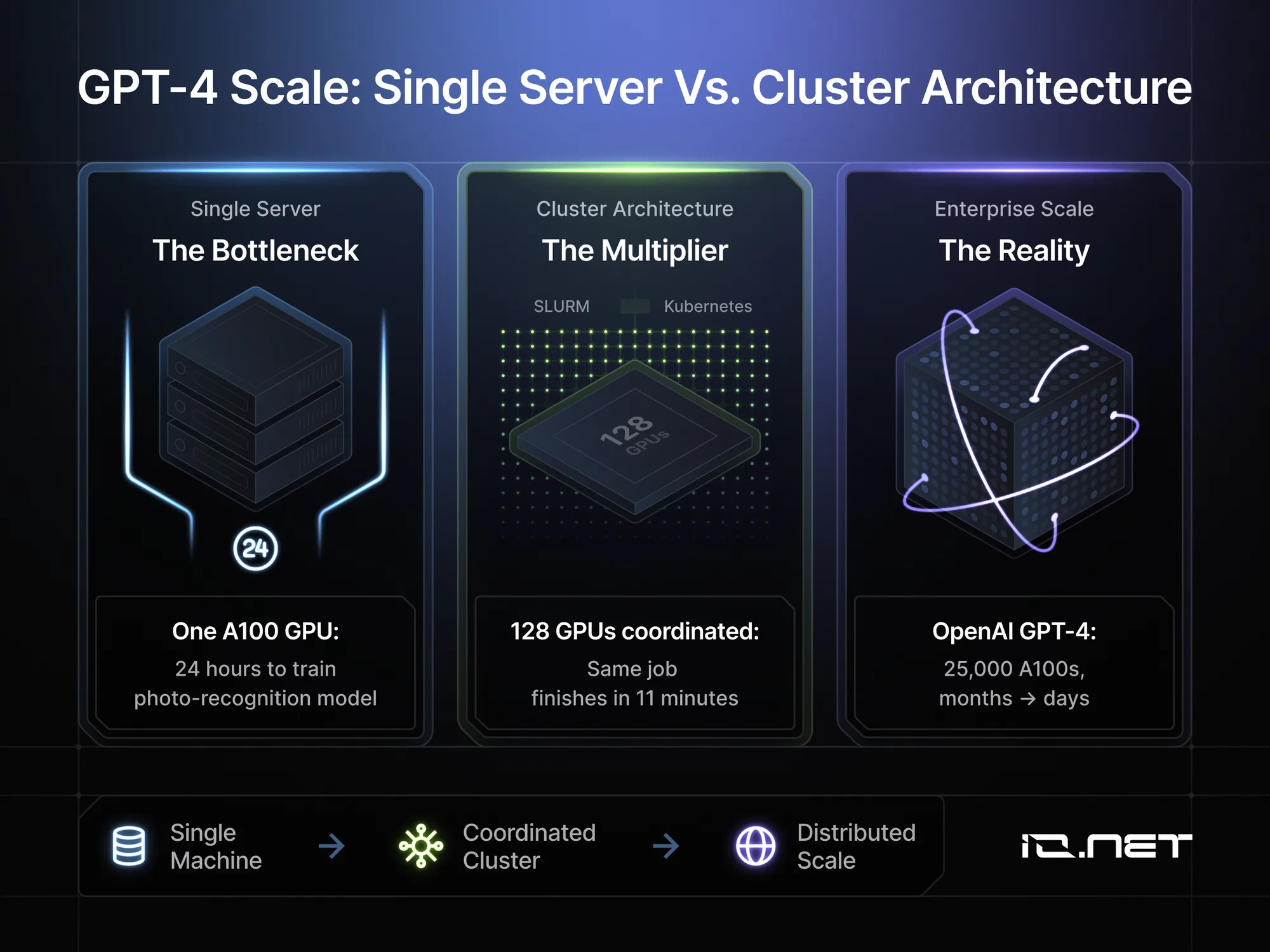
Take OpenAI's GPT-4 as an example. Their team didn't train GPT-4 on one giant server; they used about 25,000 A100 GPUs in parallel, turning months of compute into 90 days. But again, a GPU cluster isn't just a bunch of GPUs. Instead, it's multiple machines operating as one, coordinated through high-speed networking and orchestration software, to reach massive scale and efficiency.
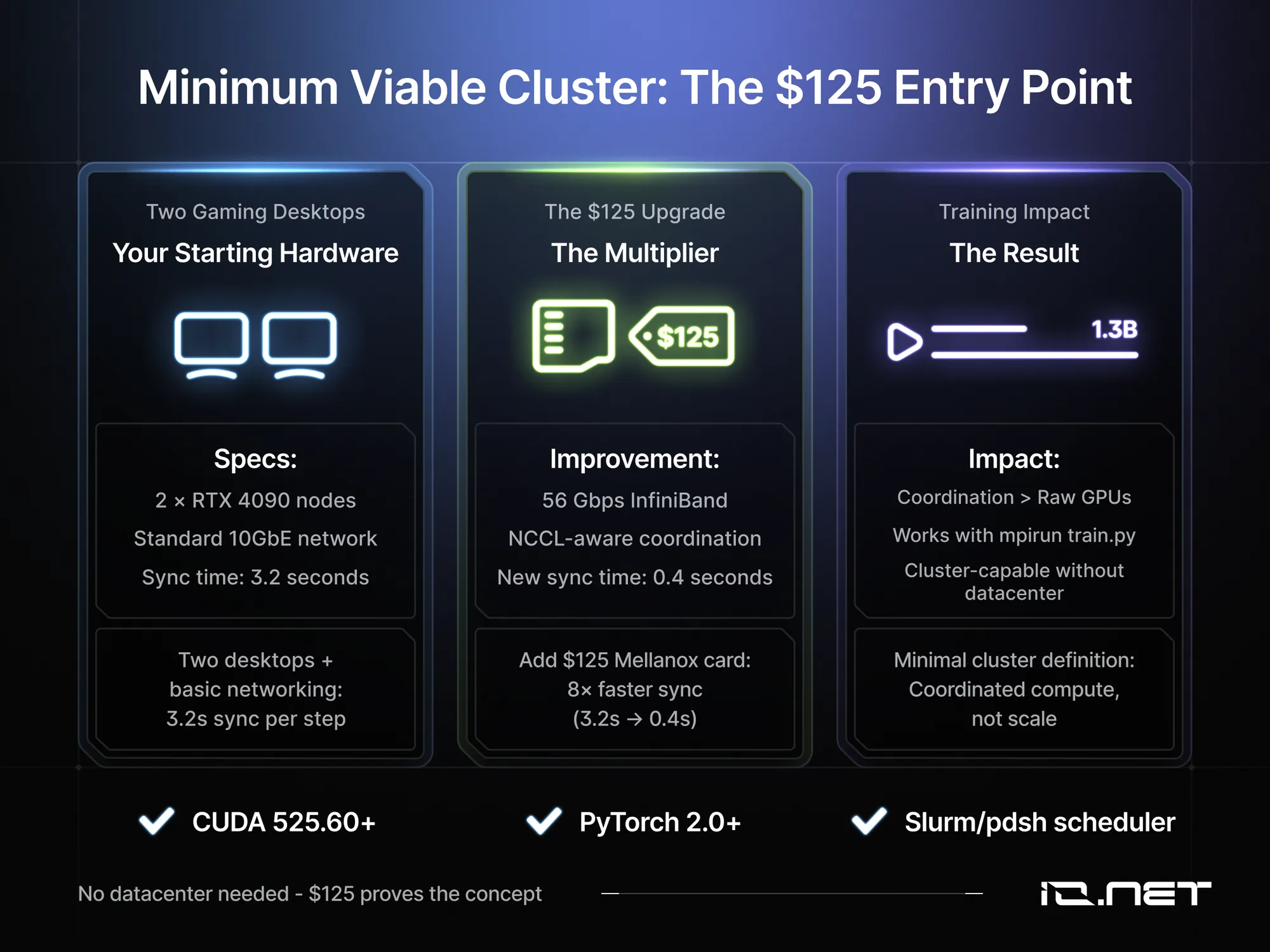
Storage feeds all cores simultaneously. Software like SLURM or Kubernetes splits your training job across hundreds of GPUs. A more minimal cluster is just two computers, each with one or more GPUs, connected and running in sync. A $125 used Mellanox card can push inter-GPU communication to 56 Gbps over InfiniBand, cutting sync from 3.2 s to 0.4 s on a 1.3B-parameter model.
Compute-bound workloads are often limited by memory bandwidth. Profiling shows many jobs stall on data movement, not GPU power. Using higher-bandwidth cards and fast interconnects like NVLink (up to 600 GB/s per node) can cut runtimes without adding GPUs, resulting in a smaller, cheaper, and faster cluster.
GPUs ready when you are
Global decentralized network across 138 countries. Scale training and inference workloads without centralized bottlenecks.
What Are The Per-Hour Costs of A GPU Cluster
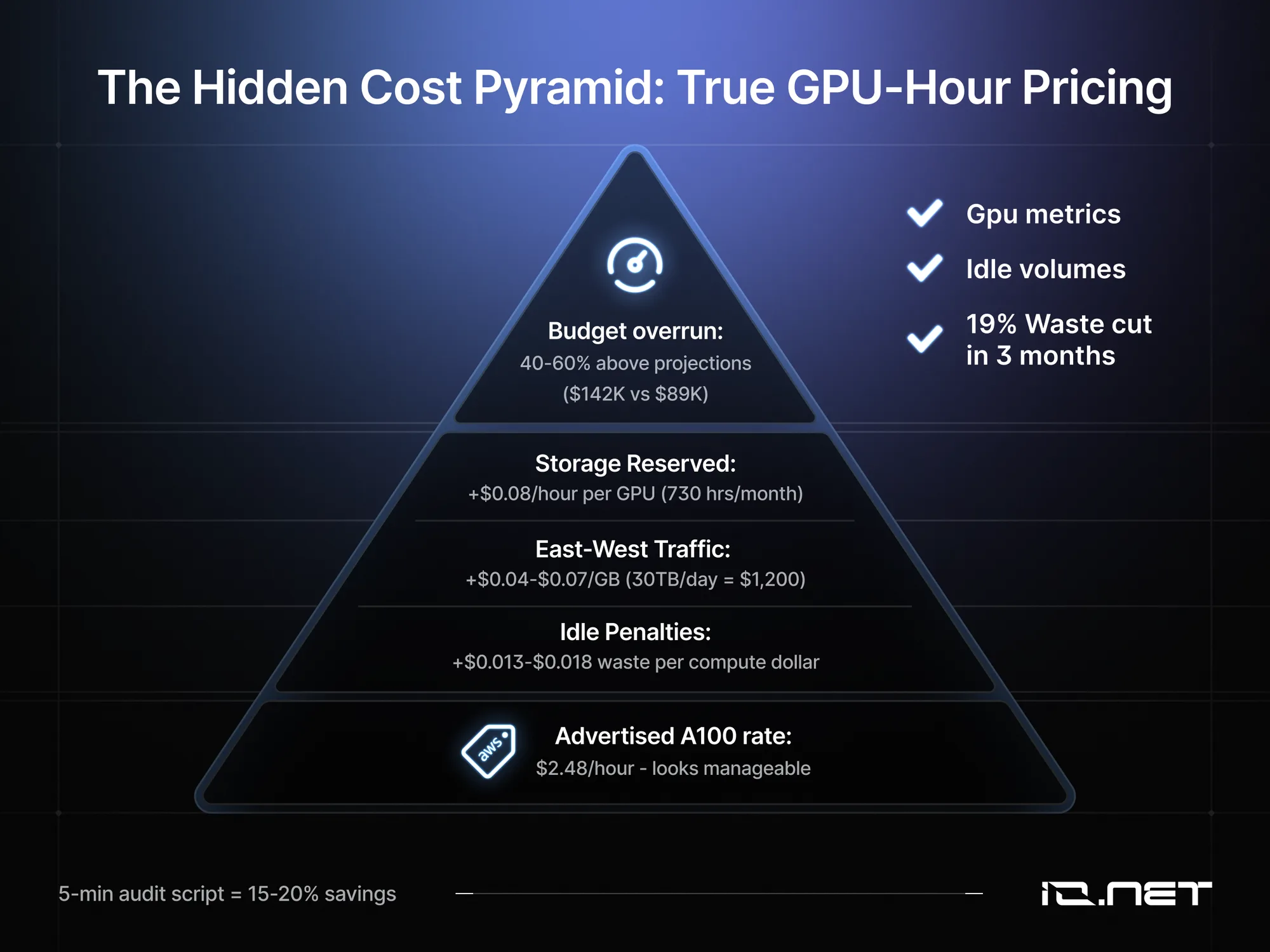
Advertised pricing is often misleading when it comes to GPU clusters. AWS lists an A100 GPU at $2.48/hour, but real training costs are higher. VPC networking, NAT gateways, cross-AZ transfers, shared storage, and idle autoscaling can push the true per-GPU-hour price far above the list rate, often overshooting budgets by 40-60%. This is a cost that most AI startups, especially at the pre-seed stage, can ill afford.
This is to say nothing of the hidden costs, which pop up in three primary areas. First, east-west cluster traffic like log shuffling, checkpoint writes, and parameter-server updates runs $0.04-$0.07/GB. Moving 30 TB/day on a 128-GPU job can cost around $1,200 daily. Second, storage reservations are billed for 730 hours/month, regardless of GPU usage. A 50-terabyte SSD tier adds $0.08 per hour per GPU.
Third, idle penalties from nightly gaps, container rebuilds, and queue backlogs waste $0.013 to $0.018 for every compute dollar. A simple infrastructure audit can reveal a surprising amount of waste. Pulling CPU, storage idle-time, and GPU run-hour data from CloudWatch often uncovers misaligned capacity and unused volumes.
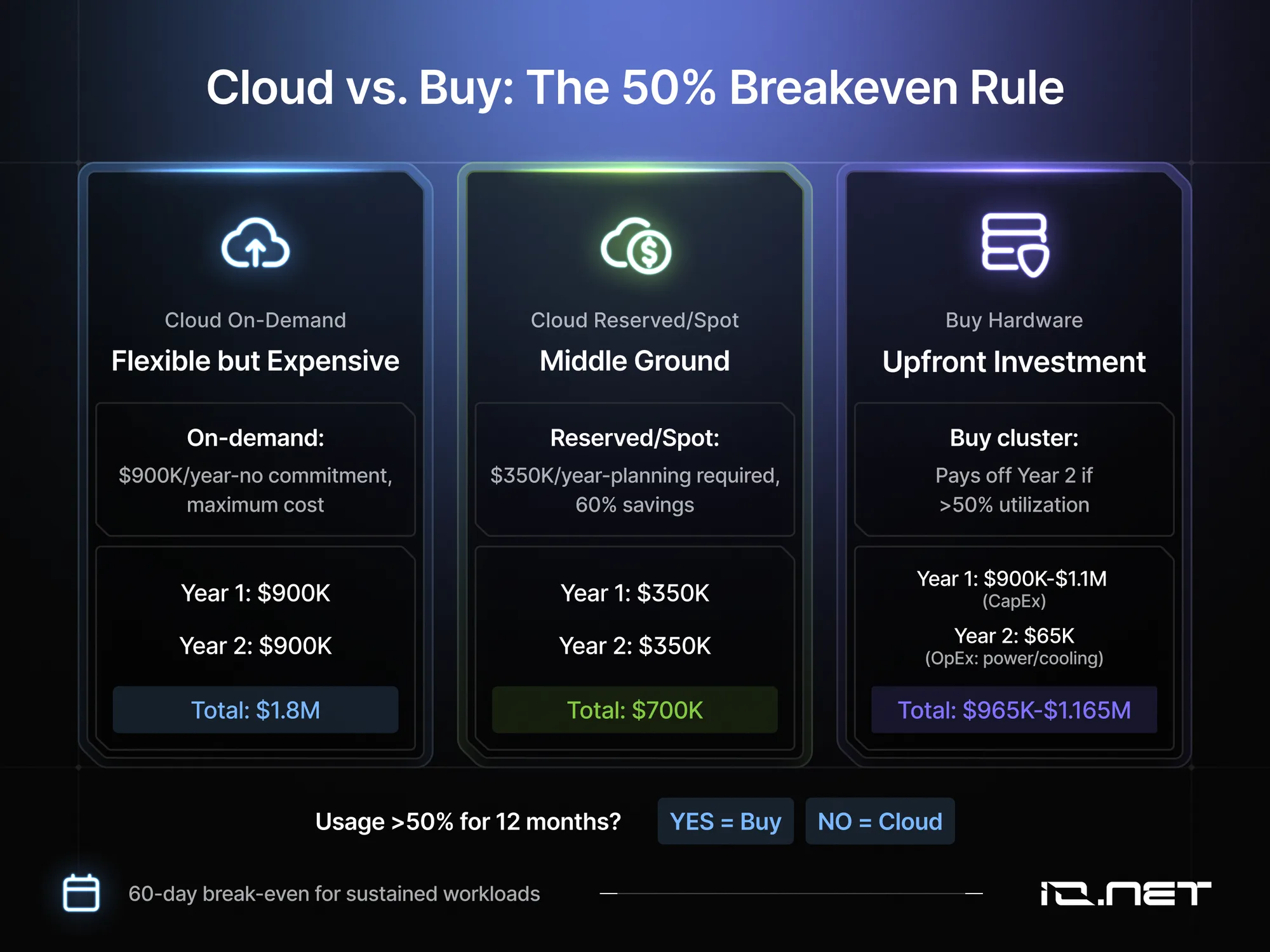
Regular audits can trim 15-20% of waste in months. No code changes, just better bin-packing and shutting down idle resources. The cloud-versus-buy decision depends on the time horizon. Renting 32 A100s costs around $900K/year on-demand and about $350K with reserved or spot pricing.
Buying the same GPUs plus nodes, InfiniBand, and storage runs $900K-a substantial sum. Using more than 50% capacity for 12 months? Buying pays off by year two. Otherwise, cloud bursting wins.
Cut GPU costs by 90%
Enterprise-grade H100s and A100s at a fraction of hyperscaler pricing. Pay only for what you use.
Best practices for integrating a GPU cluster
To avoid wasting money, start small. For example, just four RTX 4090 nodes on 100 Gb InfiniBand can train a 7B-parameter model for under $30K. Use this as your proving ground and baseline. Debug orchestration, pipelines, and train your team first, then scale to 128 A100s when needed.
It's also crucial to map your workload before you buy anything. Running NVIDIA's DCGM diagnostics across several cluster sizes (small, medium, large) helps identify the smallest configuration that maintains GPU utilization above 85%. Undersizing costs you training time, while oversizing costs you capital you'll never recover.
Automate from day one by containerizing training jobs and using schedulers like Slurm for fair resource sharing. Store a versioned Docker/Singularity image with CUDA, cuDNN, NCCL, and your ML framework to ensure reproducible environments and handle framework upgrades like PyTorch 2.x changes.
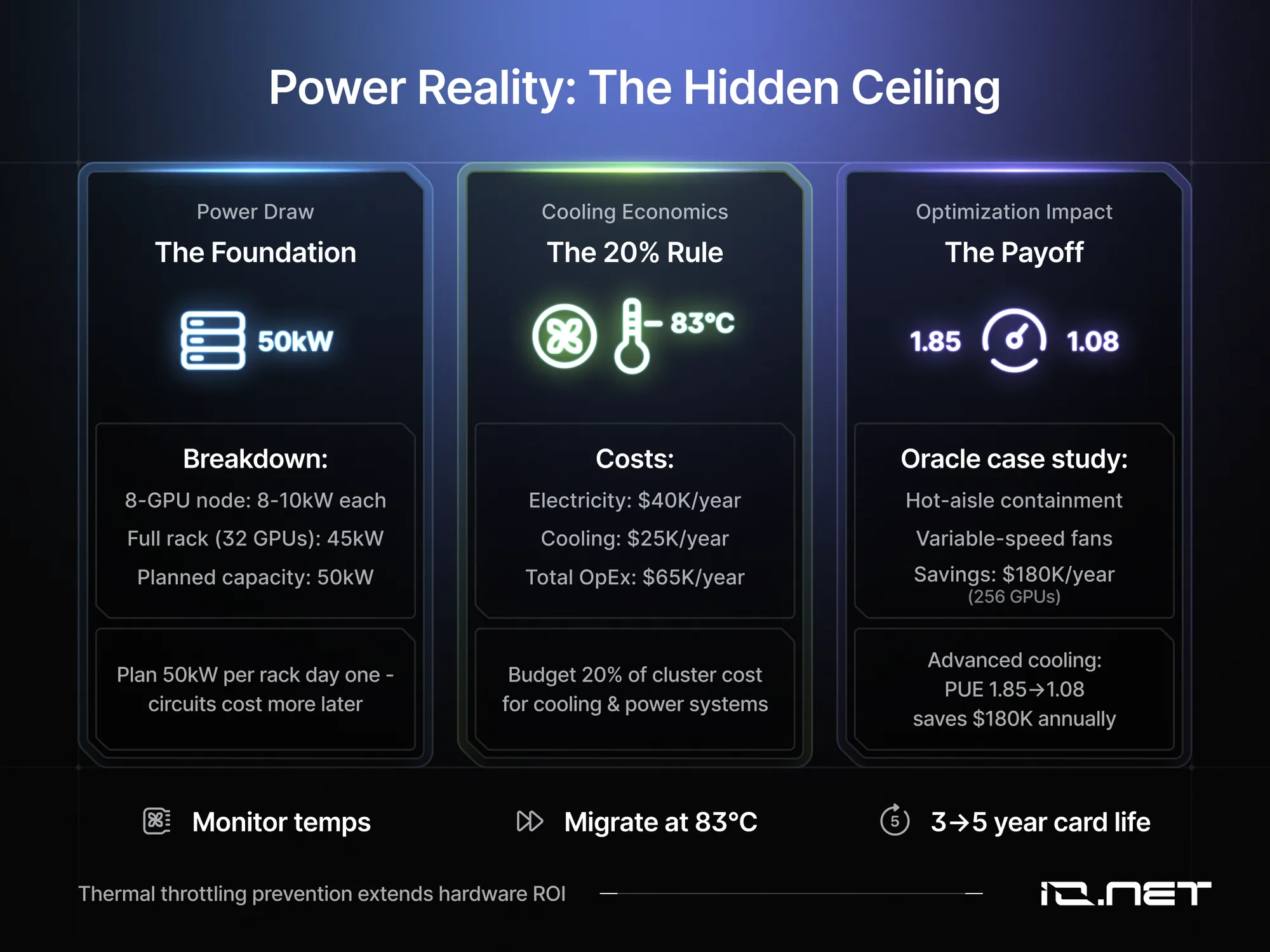
Budget approximately 20% of your cluster cost for cooling and power. Advanced cooling techniques like hot-aisle containment and variable-speed fans can reduce power usage effectiveness (PUE) from typical 1.8+ down to near 1.1. This significantly lowers electricity bills in large deployments.
Monitor GPU temperatures with tools like nvidia-smi and trigger graceful job migration around 83°C to avoid thermal throttling and extend card lifetime from about three to five years. Plan for roughly 50 kilowatts per full rack from day one to prevent costly electrical upgrades later.
Spin up H100s in under 2 minutes
No contracts. No waitlists. Deploy GPUs instantly across 138 countries.
Getting Started Without Hardware Headaches
If building your own cluster feels like overkill, decentralized GPU networks offer an enticing middle path. You get cluster-scale compute without the upfront capital or data-center logistics. To see if this is the best decision for your model training, educate yourself on provisioning distributed GPUs for training jobs, and how implementing decentralized GPU architecture helps you avoid the idle-time traps that plague traditional cloud setups.
For teams needing scalable, cost-efficient GPU clusters without the hardware overhead, VOLT offers instant access to a decentralized network of high-performance GPUs. The platform enables rapid deployment of clusters for AI training, inference, and data analysis, with streamlined orchestration and real-time monitoring.
VOLT's ecosystem supports flexible, pay-as-you-go compute with global reach and robust security.
Do the Math That Actually Matters Before Buying GPUs
We know that a GPU cluster is many GPUs running one workload, connected by fast networking and orchestration software. We've seen the four sizing levers of GPU count, interconnect, CPU/RAM, and rack power. And we now understand how they impact training time and cost.
So bring the business case for GPU build or buy to your next budget meeting. Explain that using 4-6 GPUs continuously for over 24 hours puts you in cluster territory. Lay out that build-or-buy economics beat cloud burn rates after about 60 days of sustained use, and drive the point home that rack-level power, not just GPU price, is the real ceiling.
To get started, open an AI model training cost calculator, input your model's token count and deadline, and within 90 seconds you can get an estimate of whether you need 8 A100s or 64 H100s, along with the expected impact on your power bill. Send the results to your team, pick the option best suited for your model training, then decide on the cluster that keeps you training not waiting.
Frequently Asked Questions
What is a GPU cluster at minimum?
A GPU cluster needs two or more GPUs across machines running coordinated computation. Two RTX 4090 desktops on a 10 GbE switch with mpirun train.py qualify as a cluster. For software, a CUDA driver (525.60+), NCCL-aware framework (PyTorch 2.0+), and a scheduler like Slurm. The smallest practical cluster is four nodes and four A100/H100 GPUs plus a login/storage node.
What is a GPU cluster versus a multi-GPU workstation or cloud instance?
A multi-GPU workstation maxes at 4 to 8 GPUs, while cloud instances usually cap at 8-16. A cluster links many nodes with a scheduler, running 512-GPU jobs or 2-GPU notebooks while sharing storage. Node failure loses only that node. A 175B-parameter model takes weeks on a workstation, $20K in the cloud, but finishes overnight in a cluster.
Which workloads or data sizes justify the jump to a cluster?
Move to a cluster when your model exceeds 7 billion parameters, needs more than a 7-day convergence, or your dataset surpasses local NVMe (10+ TB) with greater than 1 TB/day streaming. Weekly distributed training also justifies it. Academic labs hit this number at 100-200 GB, while enterprises reach it at 50-500 GB. For CSVs under 1 GB, a workstation will do.
What is a GPU cluster in terms of CAPEX vs. OPEX?
A 32-GPU A100 cluster (4 nodes, 8 GPUs each, InfiniBand, 200 TB flash) costs $900K to a substantial sum upfront; with H100s, it runs a substantial sum to a substantial sum. Add 15% yearly for storage and network growth. Power draw hits 8-10 kW per 8-GPU node, around 45 kW per rack. At $0.10/kWh, budget $40K in electricity plus $25K for cooling annually.
How do you size and scale a first cluster without over-provisioning?
Start with a quarter-rack pilot: 4 nodes × 8 GPUs, dual 100 Gb switches, 200 TB flash, plus one login/storage node. Use 80 GB GPUs to double model size before adding nodes. Plan full-rack power (50 kW) upfront. Delay extra GPUs until 70% utilization for 30 days. Buy same-SKU GPUs to avoid scheduler fragmentation. Lease login node and first-year storage to save capital.
Spin up H100s in under 2 minutes
No contracts. No waitlists. Deploy GPUs instantly across 138 countries.