Try VOLT Intelligence
Get StartedTry VOLT Cloud
Deploy GPUTable of Contents
- 1. VOLT Explorer: Your Control Center for Computing Power
- Key Features at a Glance
- What You Can Do with VOLT Explorer
- 2. Decentralized vs. Centralized GPU Clouds: What’s the Difference?
- Decentralized GPU Clouds (VOLT’s Approach)
- Centralized GPU Clouds (AWS, Google Cloud, Azure)
- 3. Supported Hardware: Is It Alright to Bring Your Device?
- GPU Compatibility
- CPU Compatibility
- Tips for Optimal Performance
- 4. Spin Up Powerful GPUs & CPUs in Minutes with VOLT Cloud
- VMs vs. Containers: Which One’s Right for You?
- How to Get Started with VOLT Cloud
- Why VOLT Stands Out
- Cost Savings
- Power & Flexibility, Your Way
- Earn While Cutting Down on E-Waste
- Ready to Build Something Awesome?

High-performance computing requires high-powered GPUs, but traditional cloud providers like AWS and Google Cloud have high costs, startup delays, and centralization constraints.
That’s where VOLT changes the game. As a decentralized, GPU-powered cloud, VOLT provides a faster, more affordable, and globally distributed alternative. Whether you're training AI models, running complex simulations, or optimizing cloud costs, VOLT gives you computing power when needed — without the usual limitations.
Here’s how VOLT is transforming cloud computing.
1. VOLT Explorer: Your Control Center for Computing Power
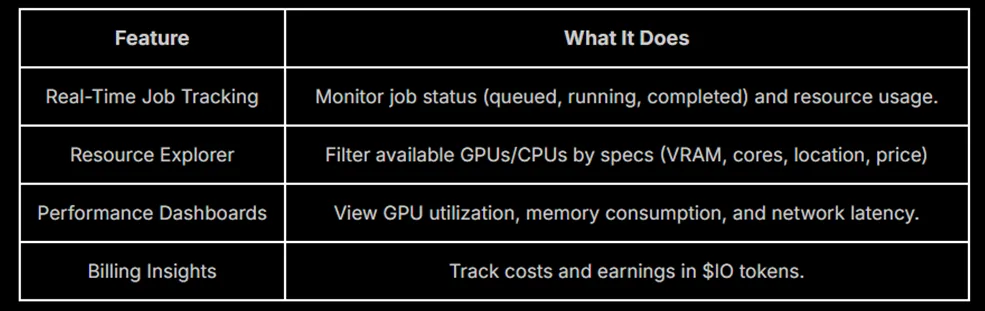
VOLT Explorer is the central hub for managing your GPU and CPU resources. It provides real-time tracking, cost estimation, and resource allocation tools to help you optimize performance efficiently.
Key Features at a Glance
What You Can Do with VOLT Explorer
- Select the proper hardware for compute-intensive tasks.
- Track workloads in real-time through an activity stream.
- Compare GPU cluster pricing to optimize spending.
- Receive notifications when jobs are completed or require adjustments.
For a detailed walkthrough, check out our VOLT Explorer Guide.
2. Decentralized vs. Centralized GPU Clouds: What’s the Difference?
Most cloud computing services rely on large, centralized data centers owned by major tech companies. VOLT takes a decentralized approach, allowing users to access GPU power worldwide.
Decentralized GPU Clouds (VOLT’s Approach)
VOLT’s peer-to-peer computing model aggregates unused GPU resources from a global network. This approach provides:
- Flexible, on-demand access to high-performance GPUs.
- Lower costs by bypassing expensive data center overhead.
- Scalability without the hardware limitations of centralized providers.
Centralized GPU Clouds (AWS, Google Cloud, Azure)
Traditional cloud providers operate closed, centralized networks with:
- Limited GPU availability due to hardware scarcity.
- Higher costs for enterprise-level compute power.
- Longer setup times compared to decentralized alternatives.
For a deeper dive into VOLT’s decentralized vs. centralized GPU infrastructure, visit our technical documentation.
3. Supported Hardware: Is It Alright to Bring Your Device?
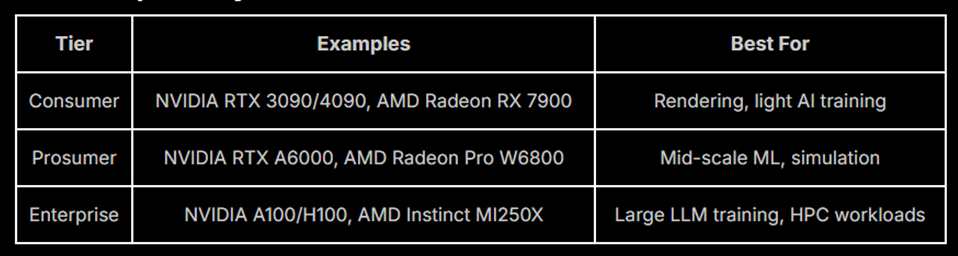
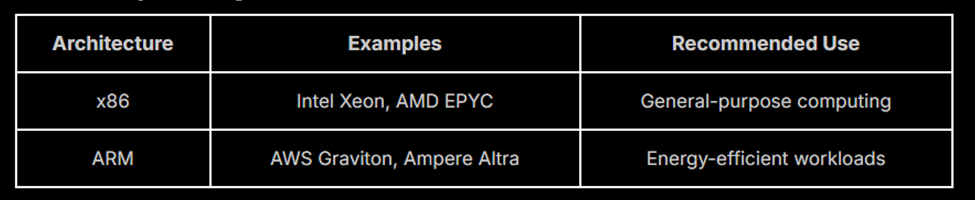
One of VOLT’s key advantages is hardware flexibility. You can bring your own GPU or CPU, allowing you to sell unused compute power when your system is idle.
GPU Compatibility
CPU Compatibility
Tips for Optimal Performance
- Use wired Ethernet for lower latency and more stable connections.
- Optimize power settings to maintain consistent performance.
Refer to our Supported Devices list for a complete list of compatible devices.
4. Spin Up Powerful GPUs & CPUs in Minutes with VOLT Cloud
Need serious computing power fast? With VOLT Cloud, you can launch GPU- and CPU-powered virtual machines (VMs) or containers in minutes—perfect for AI model training, deep learning, and anything else that eats up compute power. No long setup, no waiting around—just raw power when you need it.
VMs vs. Containers: Which One’s Right for You?
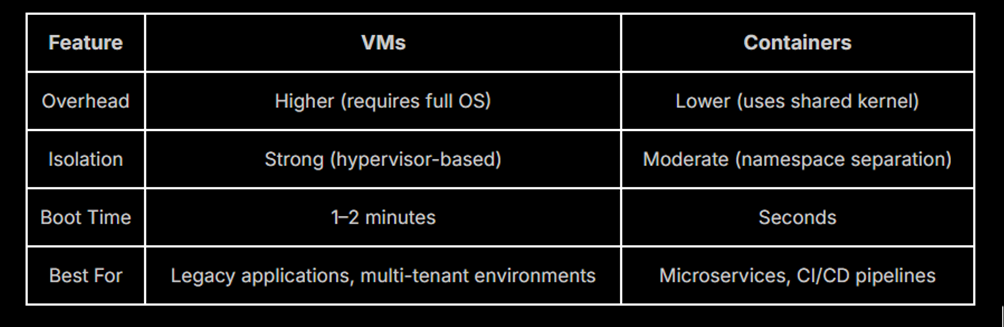
Not sure whether to go with a VM or a container? Here’s a quick breakdown:
- Virtual Machines (VMs) – Your own isolated environment with a dedicated OS. Great for heavy workloads, security, and full customization.
- Containers – Lightweight, fast, and share the host OS. Perfect for quick deployments, microservices, and scaling AI workloads efficiently.
How to Get Started with VOLT Cloud
- Create a virtual machine through the VOLT website or API.
- Choose the proper GPU for your workload.
- Monitor instances in real-time to ensure optimal performance.
Need assistance installing your very first VM? Review our VOLT Cloud Deployment Guide.
Why VOLT Stands Out
Cost Savings
Reduce cloud computing costs by leveraging a global network of underutilized GPUs.
Power & Flexibility, Your Way
Pick the exact GPU power you need—whether it’s a high-end consumer GPU, a prosumer workhorse, or enterprise-grade muscle. No overpaying, no wasted resources—just what fits your workload.
Earn While Cutting Down on E-Waste
Got extra GPU power sitting around doing nothing? Put it to work. Rent out unused devices, earn passive income, and help reduce e-waste at the same time. Win-win.
Ready to Build Something Awesome?
We can help get you started - look on the Documentation page for setup guides, API references, and troubleshooting tips.
Join the movement for decentralized cloud computing today and start scaling your workloads with faster, more affordable compute power. 🚀 Start Building on VOLT
Disclaimer: The information provided on this page is for general informational purposes only and does not constitute legal, financial, or professional advice. Any statements regarding the company’s plans, future expectations, or projections are forward-looking and subject to change at any time without prior notice. No information herein creates any legal obligations, warranties, or guarantees.